Abstract
Documenting a SAS program is not always a pleasant task
but it is essential to the success of software project
management. This paper will present a tool and an
approach to automating the documentation process without
a great deal of extra coding. Instead of typing extra
documentation information and compiling it, this utility
will extract existing information from the program header
and compile it automatically. Exploring the many features
of data step and SAS macro language enables the utility
to extract key information from the header of each
program and automatically build a data set containing
pertinent information. This data set will then be used
for project tracking and reporting. Although
documentation of SAS programs cannot be avoided all
together, there are ways of automating and lessening this
laborious task.
Introduction
If project documentation is a process of managing a
collection of information pertaining to your programs,
why not let SAS document its own programs? That is
exactly what this paper will demonstrate as it shows a
tool, the DOCUMENT utility, which automates this process.
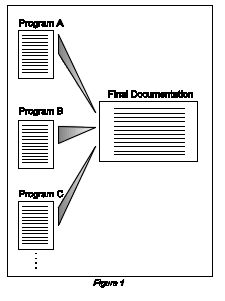
Most good
programs contain documentation in the header of its code.
As a single program, the documentation is complete since
all the necessary information is contained in its header.
In more substantial projects, however, there may exist
tens or hundreds of programs. The challenge then is to
compile all of this information from each program into
one organized and concise documentation report as shown
in Figure 1.
This final vital piece of information could be used for a
myriad of documentation purposes. Depending on the choice
of information and sort order, this information could
simply generate an alphabetical list of the programs; or,
it could show a complex report, such as the chronological
order of the programs broken down by different
programmers from the project team with various
input/output data sets. This paper will not attempt to
show all the different ways of reporting the final
project documentation since that is specific to the
regulatory or management requirements of each project.
Instead, it will demonstrate a technique of gathering the
information and storing it into a SAS dataset for better
management and reporting of this documentation data.
There will be some simple sample reports for illustrative
purposes.
The first section of this paper will show how the
DOCUMENT utility is used without going into the details
of the programming. The second section will highlight
some of the programming techniques of DOCUMENT using SAS
macro language and data step manipulations. Not every
single line of code will be discussed here but sections
will be highlighted to give a conceptual understanding.
The entire program code will be included in the Appendix.
Using the DOCUMENT Utility
The steps in using the DOCUMENT utility include the
following:
- Modify
all SAS programs which are to be documented to
have uniform header information
- Specify
the types of desired specification for
documentation in the DOCUMENT program
- Run
the DOCUMENT program to generate the final report
Uniform
Header Information
In order for this utility to extract the proper
information, the header information in all programs needs
to be consistent. An example of a header for a program
may be:
*********************************************************
Project Code : XYZ1012
Program Name : vitalhyp
Programmer : Vincent Clark
Date : 02/13/95
Modified by/Date : none
Input Data : dosefile, trtfile, aefile
tempfile
Output Data : none
External Macros : none
Input ASCII Files : none
Output ASCII Files : none
Purpose of Program : Create table for Vital Signs During
Treatment Period broken down by
hypertension
********************************************************;
The key fields containing comments for documentation
include Project Code, Program Name, Programmer, Date and
so on. If another program in the project has Program
Location instead and does not contain other corresponding
fields, DOCUMENT will not be able to compile the
information since it will not find any fields in common.
This utility is very picky in matching up header
information because it uses SAS data step to merge and
correlate its information. For example, Program Name and
Name of Program will not merged properly. The utility is
strict upon its format but this will allow for accurate,
and consistent documentation. It is therefore recommend
that your programs have a standard header for each
project.
A few other conventions have to be followed in order for
DOCUMENT to logically extract correct pieces of
information from the header of each program. These
include:
· A colon following the field name of the comment
· Comments having no leading or trailing asterisks
· A row of asterisks distinguishing the beginning of the
header and another row distinguishing the end of the
header
There may be cases where a colon may appear inside the
comment as shown here:
Program Name : vitalhyp
Purpose of Program : Create table: Vital Signs, Patient
History and Adverse event.
In this case, the DOCUMENT algorithm ignores the second
colon and treats the text following Create ... as part of
the comment.
It may be common to have comments surrounded by asterisks
as follows:
*********************************************************
** Project Code : XYZ1012 **
** Program Name : vitalhyp **
** Programmer : Vincent Clark **
********************************************************;
The DOCUMENT algorithm considers all characters to be
part of the comment so the leading and trailing asterisks
will also be included as part of the documentation if
this were to be done. For better results, it is
recommended that only the actual comment text be included
inside the header.
The default setting of the algorithm looks for a line of
asterisks to determine the beginning and end of the
header section. DOCUMENT will get confused if you change
the separator to something else as shown here with
dashes:
/*-------------------------------------------------------
Project Code : XYZ1012
Program Name : vitalhyp
Programmer : Vincent Clark
-------------------------------------------------------*/
If this style is your preference, you may choose to
change the DOCUMENT algorithm to search for dashes
instead of asterisks. For simplicity, it is recommended
that you follow the asterisks scheme as a separator.
"Rules, Rules, Rules..." You may be asking, is
it worth all of the trouble of standardizing all the
header information just for this final documentation? I
would suggest 'Yes'. This encourages you to organize your
documentation at a project level and create a standard
header template instead of haphazardly creating header
documentation on the fly. This standard could only help
since the same structure is needed even if things were
done manually at the end of any project.
User Specification
Since the DOCUMENT utility is a SAS program in itself,
specifications are made by modifying the program. To
better facilitate this, the program was organized with a
section at the beginning allowing for your
specifications. This is the only section of the program
which requires modification for the compilation of
documentation information. The specifications are:
Path
%let path = c:\dev\document\method2;
The path is the directory which contains programs in your
project. You may specify the proper directory as defined
in a LIBNAME definition specific to your system, even
though the example is an MS-DOS directory path.
Programs
%let maxprog = 2;
filename inprog1 "&path\sample1.sas";
filename inprog2 "&path\sample2.sas";
The first parameter, maxprog is a count of the number of
programs in your project. The following filename
references define the exact names of your programs.
Key Comment Fields
%let maxkey = 11;
%let key1 =Project Code :;
%let key2 =Program Name :;
%let key3 =Date :;
%let key4 =Programmer :;
. . .
Similar to the program’s references, the first
parameter, maxkey is a count of the number of key comment
fields in each program header. The remaining definitions
spell out the exact description of each comment field of
the program header. Since the DOCUMENT program does a
text search, make sure you specify the exact spelling
including the colon. It is recommend to copy and paste an
actual header into this section for accuracy.
Sort order
%let sortord = key2 key3;
The key comment fields specified here corresponds to the
ones defined above. This will be used in a PROC SORT
which sorts all the programs in your project before it is
reported in the final documentation.
Titles and Footnotes
title1 "Final documentation project Xyz1012";
footnote1 "Source: &path\document.sas
(&runstamp)";
This piece of information is used for the sample reports
which comes with DOCUMENT. If you choose to use more
elaborate reporting schemes, such as a DATA _NULL_, you
may ignore this section.
Once all specifications have been made, execute this SAS
program like any other program and the result should be
in the OUTPUT window or the LIS file, depending on the
mode of execution (interactive or batch). The program
does not contain elaborate reporting features since that
may depend on the specifics of the project requirements.
You can add report generating code to fit your specific
documentation needs by two methods:
· Write a separate program to report the permanent
DOCUMENT data set generated by the utility
· Add code to the bottom of the DOCUMENT program to
generate the report
You may choose from any of the various reporting tools
from the SAS System such as: PROC PRINT, PROC REPORT,
PROC TABULATE, DATA NULL, etc...
Programming the DOCUMENT Utility
DOCUMENT was written using SAS macro language which
allowed for the separation of user specifications and
actual program code. It also used various data step
manipulation to manage the documentation information. The
code is broken down into five parts in this description
for clarity. Some parts will not be fully described
although the entire program can be found in Appendix 1.
1. Header Information
*********************************************************
Program Name : document.sas
Programmer : Sy Truong
Date : 06/07/95
Modified by/Date :
Input Data :
Output Data : none
External Macros : none
Input ASCII Files : none
Output ASCII Files : none
Purpose of Program : Reads existing programs as text
files via data input file and
extract header information.
********************************************************;
This is the header of the DOCUMENT program. It follows
the conventions used in programs it documents.
2. User Specification
This part of the program allows you to specify project
specific information. This is explained in detail in the
above section User Specification.
3. Code Generating Macros
This section uses SAS macro language to generate the
necessary code in the documentation algorithm. Since your
specifications are dynamic, this section generates its
code accordingly. For example, the %do_lab macro assigns
labels to each comment variable with the description
specified by you:
%macro do_lab;
%do i = 1 %to &maxkey;
label fincom&i = "&key&i";
%end;
%mend do_lab;
The first line initiates a loop which repeats according
to what you specified for the maxkey parameter. The label
statement is then generated using &i as the
incrementing index. Each label statement generated has a
new incremented &i value. The &key&i refers
to the macro variable containing the description of each
comment field which you specified in the section above.
4. Document Algorithm
This section is encapsulated in a macro which generates
itself for each input program in the project. The first
and main part is a data step named work.documen.
%do x = 1 %to &maxprog;
*** Read the program and extract neccesary header
information ***;
data work.documen (keep = fincom1-fincom&maxkey);
infile inprog&x lrecl=&pgsize missover pad
end=eof;
input @1 inrow $175. @;
. . .
if substr(inrow,1,15) = '***************' then
astercnt = astercnt +1;
It reads the input file with an infile command, scanning
one line at a time. If the line matches the asterisk
criteria, it triggers a counter which is used to
determine the beginning and end of the header.
do i = 1 to &maxkey;
clength = length(_key(i));
if substr(inrow,1,clength) = _key(i) then do;
*** Determine where the comment starts ***;
start = 0;
do j = length(inrow) to 1 by -1;
if substr(inrow,j,1) = ":" then start = j;
end;
Once it determines that it is inside the header section
of the program, the heart of the algorithm is executed.
This dissects each line one at a time. Scanning for the
first occurrence of the column, it then separates the
comment from the key field name. There is an added logic
added to detect if a colon was found.
if start > 0 then do;
*** Assign the comment text and label ***;
_commnt(i) = substr(inrow,(start+1));
end;
end;
...
*** Output only one record containing comments ***;
if astercnt = 2 and lag(astercnt) = 1 then do;
*** Assign labels to each variable ***;
%do_lab;
output;
end;
run;
*** Append each documentation to the end of the final
documentation data set ***;
proc append base = work.fdocumen data = work.documen;
run;
In the case where no colons were found, it holds on to
this line of text and appends it to the end of the
previous comment, since this may be a continuation of the
previous comment field. The algorithm determines that the
end of the header is reached by using the asterisk count
once again. At this point, all the key fields get labels
assigned to it via the %do_lab macro. This observation is
then finally appended to a final data set called
work.fdocumen.
5. Sorting and Reporting
proc sort data = work.fdocumen;
by &sortord;
run;
proc print data = work.fdocumen
split = ': ' width=minimum label;
run;
This is the last section which sorts the final data set
according to your specifications and then reports the
resulting information. The default report just dumps the
data by the use of PROC PRINT. More elaborate reporting
schemes is left open for your modification.
Summary
The DOCUMENT program provides a technique for project
documentation without the need for re-typing and manually
organizing the documentation of each program. It does
require some structure in the way programs are commented
in the header section. Once this is done, DOCUMENT uses
features of the DATA step and SAS macro facility to
compile this information and stores it in a SAS data set
for final documentation.
Appendix
This includes the entire DOCUMENT program’s code:
*********************************************************
Program Name : document.sas
Programmer : Sy Truong
Date : 06/07/95
Modified by/Date :
Input Data : none
Output Data : document
External Macros : none
Input ASCII Files : vitalhyp.sas, tabdelim.sas
Output ASCII Files : none
Purpose of Program : Reads existing programs as text
files via data input file and
extract header information.
********************************************************;
********************************************************;
** B E G I N U S E R S P E C I F I C A T I O N ***;
********************************************************;
*** Define location or files ***;
%let path = c:\dev\document\method2;
*** Define the linesize length ***;
%let lnsize =120;
*** Define libname reference to location of programs ***;
%let maxprog = 4;
filename inprog1 "&path\vitalhyp.sas";
filename inprog2 "&path\tabdelim.sas";
filename inprog3 "&path\adverse.sas";
filename inprog4 "&path\demog.sas";
*** Define number of key fields and header fields ***;
%let maxkey = 11;
%let key1 =Project Code :;
%let key2 =Program Name :;
%let key3 =Date :;
%let key4 =Programmer :;
%let key5 =Modified by/Date :;
%let key6 =Input Data :;
%let key7 =Output Data :;
%let key8 =External Macros :;
%let key9 =Input ASCII Files :;
%let key10 =Output ASCII Files :;
%let key11 =Purpose of Program :;
*** Define the sort order specifying the key fields ***;
%let sortord = key2 key3;
data _null_;
call symput('runstamp',put(datetime(),datetime13.));
run;
*** Define the titles and footnotes for the report ***;
title1 " ";
title2 " ";
title3 "Final documentation project X";
footnote1 " ";
footnote2 " ";
footnote3 "Source: &path\autodoc.sas
(&runstamp)";
********************************************************;
*** E N D U S E R S P E C I F I C A T I O N ***;
********************************************************;
*** Define SAS options for this session ***;
options macrogen mprint center ls=&lnsize ps=60;
options nodate pageno=1;
*** Macro to generate the variables for each key var ***;
%macro do_key;
%do i = 1 %to &maxkey;
key&i = "&key&i";
%end;
%mend do_key;
*** Macro to label variables for reporting purposes ***;
%macro do_lab;
%do i = 1 %to &maxkey;
label fincom&i = "&key&i";
%end;
%mend do_lab;
*** Macro to rename variables for reporting purposes ***;
%macro do_renm;
%do i = 1 %to &maxkey;
rename fincom&i = key&i;
%end;
%mend do_renm;
*** Macro to extract header information from program ***;
%macro do_extr;
*** Iterate this macro for each program ***;
%do x = 1 %to &maxprog;
*** Read the program and extract neccesary header
*** information ***;
data work.documen (keep = fincom1-fincom&maxkey);
infile inprog&x lrecl=&lnsize missover pad
end=eof;
input @1 inrow $120. @;
*** Initialize the array containing key comment
*** fields ***;
array _key(*) $80 key1-key&maxkey;
%do_key;
*** Create temporary comment field for retaining
*** last line ***;
array _commnt(*) $&lnsize commnt1-commnt&maxkey;
*** Define temporary comments retain to maintain
*** last observation ***;
retain tmpcom1-tmpcom&maxkey ;
array _tmpcom(*) $&lnsize tmpcom1-tmpcom&maxkey;
*** Define an array which contains the final
*** comments ***;
retain fincom1-fincom&maxkey;
array _fincom(*) $&lnsize fincom1-fincom&maxkey;
*** Determine the header block by checking the
*** asterisks blocks ***;
retain astercnt 0;
if substr(inrow,1,15) = '***************' then
astercnt = astercnt +1;
*** Extract the comments information within the
*** header block ***;
if astercnt = 1 then do;
*** Initilize if there is a header match ***;
hmatch = 0;
retain locmatch;
do i = 1 to &maxkey;
clength = length(_key(i));
if substr(inrow,1,clength) = _key(i) then do;
hmatch = i;
locmatch = i;
*** Determine where comments start ***;
start = 0;
do j = length(inrow) to 1 by -1;
if substr(inrow,j,1) = ":" then
start = j;
end;
if start > 0 then do;
*** Assign the comment and label ***;
_commnt(i) = substr(inrow,(start+1));
end;
end;
end;
if hmatch = 0 then do;
if substr(inrow,1,15) ne '***************'
then do;
*** Determine the starting point ***;
start = 0;
do j = length(inrow) to 1 by -1;
if substr(inrow,j,1) ne " " then
start = j;
end;
_commnt(locmatch)=trim(_tmpcom(locmatch))
|| ' ' || trim(substr(inrow,start));
end;
end;
*** Hold the current comments for possible
*** additions ***;
do k = 1 to &maxkey;
_tmpcom(k) = _commnt(k);
end;
*** Assign values to final comments if comments
*** exist ***;
do i = 1 to &maxkey;
if _commnt(i) ne '' then
_fincom(i) = _commnt(i);
end;
end;
*** Output only one record containing all the
*** comments ***;
if astercnt = 2 and lag(astercnt) = 1 then do;
*** Assign labels to each variable ***;
%do_lab;
output;
end;
run;
*** Append each documentation to the end of the final
*** documentation data set ***;
proc append base = work.fdocumen data = work.documen;
run;
%end;
%mend do_extr;
*** Initialize the final data set ***;
data work.fdocumen (keep = fincom1-fincom&maxkey);
length fincom1-fincom&maxkey $&lnsize.;
array _fincom(*) $&lnsize fincom1-fincom&maxkey;
do i = 1 to &maxkey;
_fincom(i)=" ";
end;
*** Assign labels to each variable ***;
%do_lab;
run;
*** Invoke extracting macro ***;
%do_extr;
*** Rename the variables to match orignial key ***;
data work.fdocumen;
set work.fdocumen;
%do_renm;
run;
*** Sort according to specified order ***;
proc sort data = work.fdocumen;
by &sortord;
run;
*** Generate the resulting report ***;
proc print data = work.fdocumen split = ': '
width=minimum label;
run;
*** Create permanent data set for furhter
*** documentation ***;
libname outdata "&path";
data outdata.document;
set work.fdocumen;
run;
SAS is a
registered trademark or trademark of SAS Institute Inc.
in the USA and other countries. ® indicates USA
registration.
|